It is always difficult when it comes to decide and making final call choosing cad mouse, hence we are here today so be sure to check the product reviews that will solve your confusion and save time. Reviews are a great way to find out if the product is right for you and whether it has any design flaws. If there are multiple bad reviews, you may want to look at other products. Negative reviews can tell you a lot about the product, including things you may not have thought to consider. They can tell you about any potential issues with the product. They can also tell you about issues with the manufacturer’s customer service. To help you out, we’ve collected reviews of what we think are the cad mouse this year. Before you proceed with anything, read through our thoughts on the top cad mouse, as well as an overview of what you need to know when considering your buying
In this in-depth review guide, we will discuss about the best cad mouse.
Our Top Picks
1
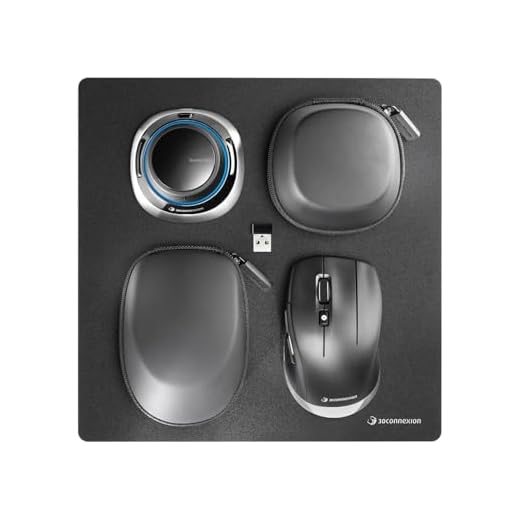
3Dconnexion SpaceMouse Wireless - Bluetooth Edition 3DX-700115
ProtoArc EM02 Wireless Trackball Mouse, 0/15° Adjustable Angle, Gray | Two Ergonomic Modes, Thumb Control to Reduce Fatigue, 3 Devices Bluetooth & 2.4G,...
Logitech Ergo M575S Wireless Bluetooth Trackball Mouse - Graphite Blue Ball | Easy thumb control, precise and smooth tracking, Bluetooth and includes Logi...
The space mouse compact was developed to deliver an intuitive, effortless and precise 3D navigation in CAD applications that cannot be experienced by using a standard mouse and keyboard.
Six-degrees-of-freedom (6Dof) sensor - intuitively and precisely navigate digital models or views. Operating system - Windows 10, Windows 8.1, Windows 7 SP1,Apple macOS 10.14, Apple macOS 10.13, Apple macOS 10.12, Apple OS X 10.11, Apple OS X 10.10. Linux Red Hat Enterprise Linux Workstation 4, 5, Linux Novell SUSE Linux 9.3, 10, 11
Each of the space mouse compact's two buttons opens its own 3Dconnexion radial menu. They provide direct access to up to 8 of your favorite application commands.
With its iconic, pure design, the space mouse compact is small enough to fit on every desk while the brushed steel base ensures the device stability for precise 3D navigation.
Seamless 3-Device Switching: This wireless mouse supports two Bluetooth 5.3/5.0 connections and 2.4GHz USB-A connectivity, letting you connect up to 3 devices at once. In Bluetooth mode, the computer mouse pairs with two devices to free up USB-A ports—ideal for USB-less devices. For 2.4GHz mode, just plug in the bottom-mounted USB receiver for instant use (no software needed). With one button, switch freely between all 3 devices for smooth multitasking and maximum efficiency(Note: All buttons are non-programmable.)
Precision Metal Scroll Wheel: The wireless mouse features a precision-crafted metal scroll wheel that not only offers a more metallic luster and technological appeal visually but also delivers a uniquely cool and smooth tactile sensation. It significantly enhances the overall texture and durability of the mouse.
High-Precision 6-Level DPI Control: Equipped with a high-performance chip, this Bluetooth mouse offers 6 adjustable DPI settings (4800/3200/2400/1600/1200/800). The LED indicator shows the selected DPI by the number of blinks—for easy checking. Whether you need precise control for detailed work or fast movement for browsing, this Bluetooth mouse for laptop adapts to all your needs.
Side Scroll Wheel for Ease: This wireless Bluetooth mouse features a side-mounted scroll wheel for effortless horizontal scrolling. With a gentle flick of the finger, navigate spreadsheets, web pages, or design canvases horizontally—reducing wrist strain during long sessions and saving time on view adjustments to boost efficiency(Note: Some older document versions, such as Microsoft Office 2016 and earlier, may not support the side scroll wheel.)
Rechargeable & Long-Lasting: Skip the hassle of frequent battery replacements! This wireless mouse for laptop is a rechargeable wireless mouse that fully charges in 1.5–2 hours and lasts up to about 3 months with 2 hours of daily use (charging cable included). Ideal for anyone seeking a convenient, long-lasting mouse.
Quiet Clicks, Focused Work: Silent clicks, no disturbance—perfect for offices, libraries, or focused work. This wireless silent mouse delivers precise, comfortable control, free from loud clicking noise.
Wide Compatibility: This wireless computer mouse works with Windows, macOS, Chrome, and Linux laptops (side buttons are not supported on macOS). The computer mouse wireless enters auto sleep after 10 minutes of inactivity to save power, and wakes with a click. LED blinks when battery is low.
36 MONTHS WARRANTY: If you encounter any problems in using the product, please feel free to contact our professional customer service team, enjoying TECKNET 36 Months Warranty (Registered Only.)
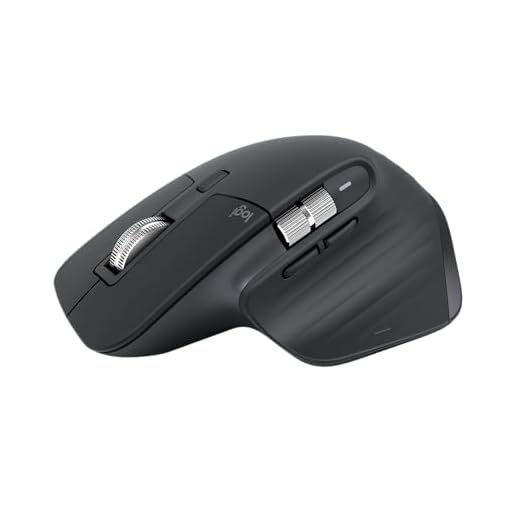
Logitech MX Master 3S Bluetooth Edition is a Bluetooth only mouse, and does not come with any USB receiver / adapter or charging cable
8K DPI Any-surface tracking: Use MX Master 3S cordless computer mouse to work on any surface - even glass (1) - with an 8000 DPI sensor with customizable sensitivity
Quiet Clicks: MX Master 3S Bluetooth mouse with Quiet Clicks - offering the same satisfying feel but with 90% less click noise (2)
Magspeed scrolling: A computer mouse with remarkable speed, precision, and near silence - MagSpeed scrolling is 90% faster (3), 87% more precise (4), and ultra quiet.
Ergonomic design: Work comfortably with a precision mouse featuring a silhouette crafted for a more natural wrist posture and optimally placed thumb controls
Countless Customizations: Customize buttons and optimize your workflow with App specific profiles in the Logi Options+ app (5)
FLOW cross-computer control: Work seamlessly on multiple computers or laptops, and transfer text, images, and files – between Windows & macOS (5)
Multi-device and multi-OS: Connect the comfort mouse with up to 3 devices via Bluetooth (6) on Windows, macOS, Chrome OS, Linux or Googlebook; Logi Bolt USB receiver not included
Plastic parts in MX Master 3S include certified post consumer recycled plastic (Graphite and Black: 27%(10).
ProtoArc EM02 Wireless Trackball Mouse, 0/15° Adjustable Angle, Gray | Two Ergonomic Modes, Thumb Control to Reduce Fatigue, 3 Devices Bluetooth & 2.4G,...
Adjustable Tilt Angle: With its customizable hinge, you can easily set the trackball to a flat 0° or a tilted 15° position. This ergonomic adjustment helps maintain a natural hand posture, reducing strain and providing personalized comfort throughout the day.
Precise Trackball Control: Navigate efficiently without moving your wrist—simply roll the trackball for smooth, accurate cursor control. Ideal for tight or cluttered workspaces, it minimizes fatigue and maximizes productivity even in limited desk areas.
Multi-Device Connectivity: Seamlessly connect via 2.4GHz wireless or Bluetooth and switch between devices with one button. Offers broad compatibility across systems (note: forward/backward buttons are not compatible with Mac OS).
USB-C Rechargeable with Extended Standby: Features a convenient USB-C charging port and an impressive 90-day standby time on a full charge. Enjoy long-lasting performance with minimal need for recharging, ensuring reliable use day after day.
Quiet Clicks & Adjustable DPI: Equipped with quiet-touch buttons, perfect for late-night work without disturbing others. Five adjustable DPI settings (200/400/800/1200/1600) allow you to fine-tune cursor speed, helping you adapt smoothly to trackball use and match your workflow precision.
Health Tip: Like any ergonomic tool, trackball mice require a short learning curve. Unlike traditional mice, they keep your wrist stable – a more natural motion that reduces pressure and fatigue. Most users adapt within 1–2 weeks. Experiment with hand positions to find your comfort. Our goal: healthier, pain‑free use for years
Cleaning Tips: After prolonged use, any trackball will accumulate dust—this is normal. If you experience issues such as stickiness, unsmooth or lack of precision, please clean the ball and the three white rollers firstly to resolve the problem.
Logitech Ergo M575S Wireless Bluetooth Trackball Mouse - Graphite Blue Ball | Easy thumb control, precise and smooth tracking, Bluetooth and includes Logi...
Less Movement, More Comfort: The sculpted shape of the ERGO M575S wireless trackball mouse keeps your hand relaxed for hours of smooth, precise tracking with thumb control - now with quiet clicks
25% less muscle strain in your forearm (1): This wireless ergonomic mouse has been developed with Logi Ergo Lab experts, user-tested and certified by ergonomists for all-day comfort
Improved forearm posture (1): The ergonomic shape of the ERGO M575S supports your hand and realigns your forearm into a better posture throughout the day; a good fit for most hand sizes
Work it your way: Experience enhanced control with 3 customizable buttons, time-saving shortcuts, and Smart Actions; adjust the cursor speed to your preference with the Logi Options plus App (2)
Save space with thumb control: With the ERGO M575S, you can move your cursor without moving your hand, making it ideal for small or space-saving setups and for use on any surface
Easy to Connect, Long Battery Life: Connect your ergonomic wireless mouse using Bluetooth or the included Logi Bolt USB receiver; enjoy up to 18 months of battery life (AA battery included) (3)
Made with recycled plastic: The plastic parts in the ERGO M575S Bluetooth trackball mouse are made of certified post-consumer recycled plastic (Graphite: 52%, Off-White: 21%) (4)
Complete your setup: Pair the ERGO M575S with the Wave Keys ergonomic keyboard, featuring a cushioned palm rest that places your hands, wrists, and forearms in a natural typing position
Note: In case of Wireless mouse, the USB receiver will be provided inside or along with the mouse Note You can clean the trackball by ejecting the ball from the ball cage.
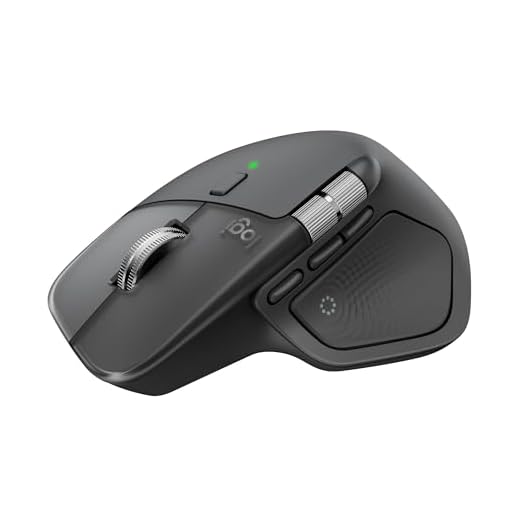
Precision you can feel with the Haptic Sense Panel; customizable (1) haptic feedback on specific actions, shortcuts, notifications enhancing productivity on this wireless Bluetooth mouse
Effortlessly access favorite tools with Actions Ring (2) on this MX Series mouse—a dynamic, customizable overlay adapts to each app, placing most used filters, adjustments, and shortcuts at your cursor
Scroll 1,000 lines per second and stop on a pixel with the MagSpeed scroll wheel—Logitech’s fastest (3), quietest, and most precise (4) scrolling experience
Enjoy 2X more powerful connectivity (7) with a USB-C dongle, advanced radio chip, and optimized antenna for faster, stronger, reliable performance—or use Bluetooth for more versatility
Ergonomic mouse designed for comfort, MX Master 4 keeps you in flow with a natural tilt, intuitive buttons, and a thumb scroll wheel that reduces hand stress for fluid navigation
Quiet Clicks on MX Master 4 reduce noise and distractions, offering a soft, satisfying feel with 90% less click noise (8)—perfect for focused workflows
Get a complimentary 1-month Adobe Creative Cloud subscription with your purchase of MX Master 4
Designed for a positive future: Plastic parts include recycled plastic - 54% Graphite; 48% Pale Grey (12); 100% recycled cobalt in the battery; built to last with improved stain resistance (7)
Compatible with Googlebook laptops: Unlock the speed, precision and ergonomic comfort needed to power through your heaviest workflows
The Video Review of Best cad mouse
The Verdict
Our best overall cad mouse, the Perception and the reviews helps assist to choose you the product better. We hope our reviews buyer guide of these cad mouse will help you pick the perfect cad mouse for you and your buying decision making.